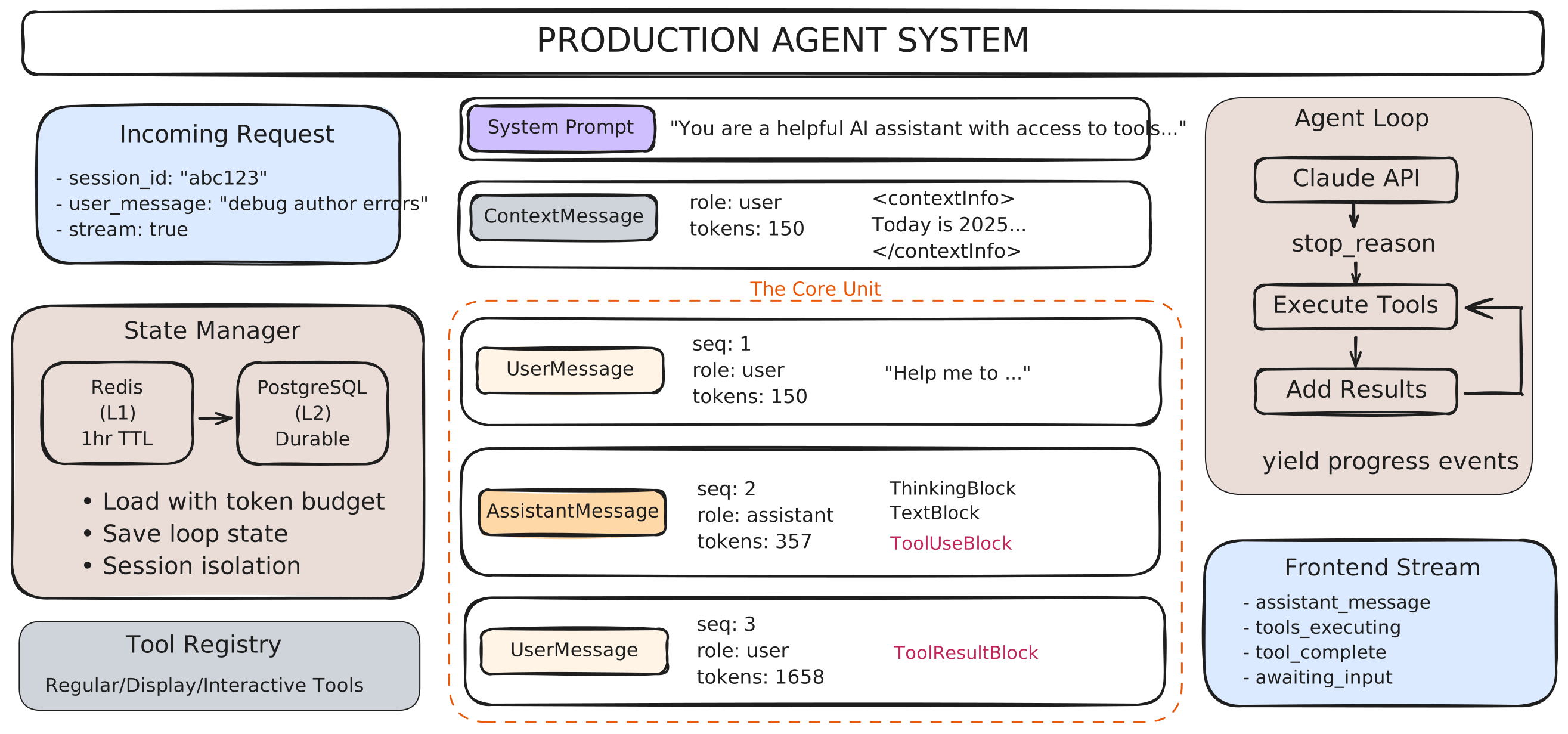
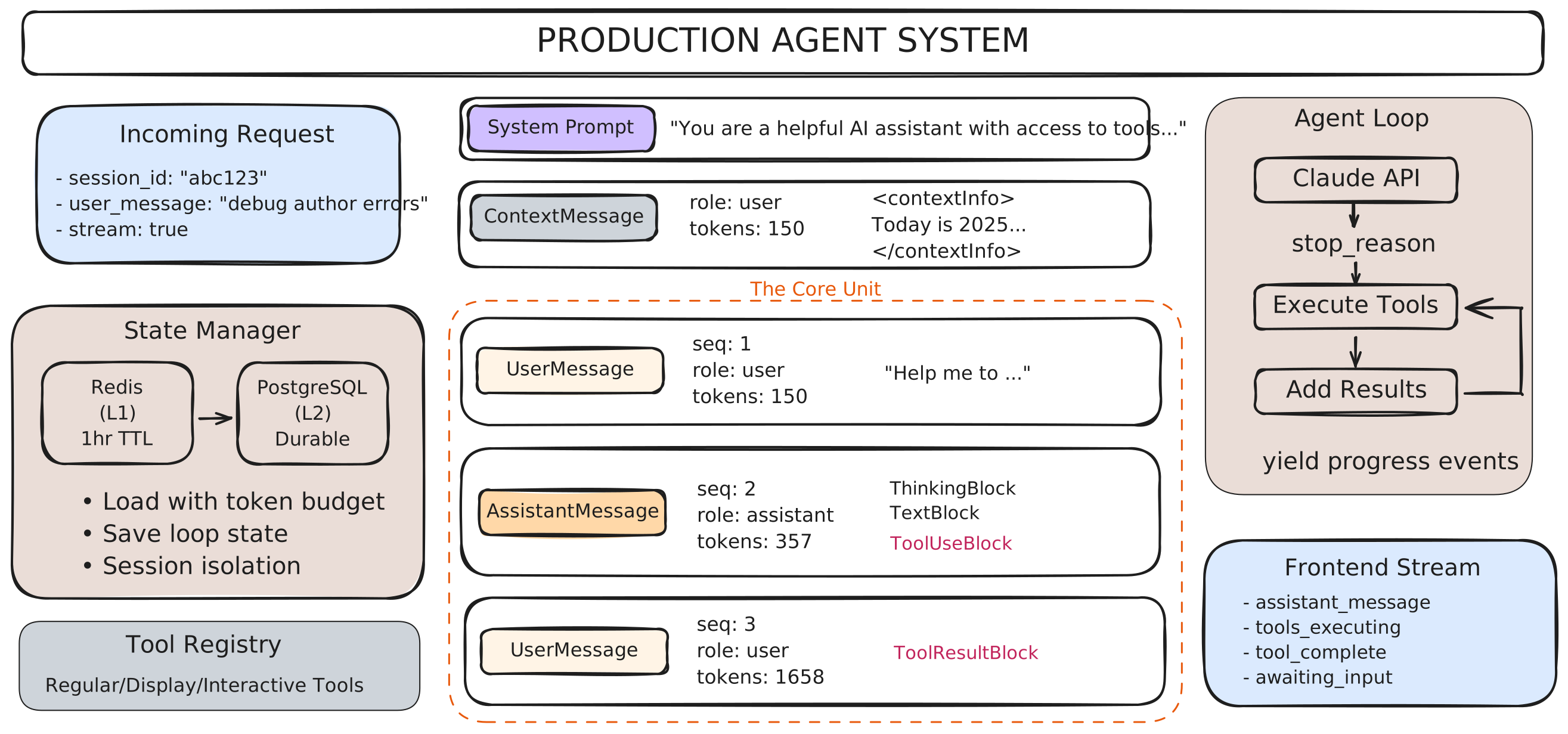
This article implements the architectural patterns from The Anatomy of a Production Agent. We’ll build production-ready code for the MessageManager abstraction, covering Redis/PostgreSQL integration, token budget queries, streaming responses, and interactive tool state management. The following diagram shows the complete system architecture:
MessageManager: The State Management Layer
MessageManager hides the complexity of persistence, caching, and loop state management—keeping your agent code clean and focused on logic. It handles the messy details: Redis/PostgreSQL dual-layer caching, token budget queries, sequence number tracking, context injection, and loop state persistence for interactive tools.
HybridStorage: L1/L2 Cache Architecture
HybridStorage implements two-tier caching: Redis (L1) for fast access with 1-hour TTL, PostgreSQL (L2) for durable persistence. The load pattern tries Redis first, falls back to PostgreSQL on cache miss, then warms the cache. The save pattern invalidates cache after PostgreSQL writes, ensuring consistency.
Two storage layers: PostgreSQL (L2) for durable persistence with indexed queries, Redis (L1) for fast caching with JSON serialization.
PostgreSQL Schema:
class Message(Base):
    """Message storage with token tracking for budget queries"""
    __tablename__ = "messages"

    # Identifiers
    message_id: Mapped[str] = mapped_column(String(36), unique=True, index=True)
    session_id: Mapped[str] = mapped_column(String(36), index=True)
    user_id: Mapped[str] = mapped_column(String(255), index=True)

    # Message data
    sequence: Mapped[int] = mapped_column(Integer)  # Order within session
    role: Mapped[str] = mapped_column(String(20))  # 'user' | 'assistant'
    content: Mapped[dict] = mapped_column(JSON)  # Flexible structure

    # Token tracking
    tokens: Mapped[int] = mapped_column(Integer)
    tokens_estimated: Mapped[bool] = mapped_column(Boolean, default=True)

    __table_args__ = (
        # Composite index for token budget queries
        Index('idx_session_sequence_tokens', 'session_id', 'sequence', 'tokens'),
        # Index for recent message queries
        Index('idx_session_created', 'session_id', 'created_at'),
        # Unique constraint per session
        UniqueConstraint('session_id', 'sequence')
    )
Redis Structure:
# Key: {session_id}:messages
# TTL: 3600 seconds (1 hour)
# Format: JSON with messages list

{
    "messages": [
        {"sequence": 1, "role": "user", "content": "...", "tokens": 150},
        {"sequence": 2, "role": "assistant", "content": [...], "tokens": 450}
    ],
    "total_tokens": 600,
    "last_sequence": 2
}

# Operations
await redis.get(f"{session_id}:messages")  # Load cache
await redis.set(f"{session_id}:messages", data, ex=3600)  # Cache with TTL
await redis.delete(f"{session_id}:messages")  # Invalidate
Why this works: Composite index enables token budget queries without full table scan. JSON column stores flexible content (text, tool blocks, artifacts). Redis caches recent 100 messages for instant access.
Cache-first pattern: Try Redis (L1) → Fallback to PostgreSQL (L2) → Warm cache. Achieves >95% cache hit rate in production.
async def load_recent_messages(self, session_id: str, limit=100) -> list[dict]:
    """Load recent messages: Redis first, PostgreSQL fallback"""

    # Step 1: Try Redis cache (L1) - sub-millisecond
    cached_data = await self.redis.get_messages(session_id)

    if cached_data:
        # Cache hit
        messages = cached_data["messages"]
        if len(messages) > limit:
            messages = messages[-limit:]  # Trim to limit
        return messages

    # Step 2: Cache miss - load from PostgreSQL (L2) - 5-20ms
    messages = await self.postgres.load_recent_messages(session_id, limit)

    # Step 3: Warm Redis cache for next request
    if messages:
        cache_data = {
            "messages": messages,
            "total_tokens": sum(m["tokens"] for m in messages),
            "last_sequence": messages[-1]["sequence"]
        }
        await self.redis.set_messages(session_id, cache_data)

    return messages
Why this works: Redis stores recent messages (last 100) for instant access. PostgreSQL provides durable fallback and full history. Cache hit rate >95% means most requests never query database.
Write-through with invalidation: PostgreSQL first (durable) → Invalidate Redis cache. Simple and prevents stale data.
async def save_message(self, session_id: str, user_id: str, message: dict):
    """Save to both layers: PostgreSQL first, then invalidate Redis cache"""

    # Step 1: Save to PostgreSQL (L2) - durable layer
    try:
        await self.postgres.save_message(session_id, user_id, message)
    except Exception as e:
        # PostgreSQL failure is critical - don't update cache
        logger.error(f"PostgreSQL save failed: {e}")
        raise  # Fail-fast

    # Step 2: Invalidate Redis cache (L1)
    try:
        # Simple invalidation - next load will rebuild from PostgreSQL
        await self.redis.invalidate_messages(session_id)
    except Exception as e:
        # Redis failure doesn't block - degraded performance only
        logger.warning(f"Redis cache invalidation failed: {e}")
        # Continue - PostgreSQL save succeeded
Why this works: Invalidation is simpler than cache append and prevents stale data. Next load rebuilds cache from PostgreSQL. PostgreSQL failure blocks (fail-fast for data consistency). Redis failure logged but non-blocking (graceful degradation).
Database setup includes initialization, module organization, and CRUD pattern for storage layer.
Database Setup (app/store/db.py):
from sqlalchemy.ext.asyncio import create_async_engine, AsyncSession
from sqlalchemy.orm import sessionmaker
from sqlalchemy.pool import NullPool

# Create async engine
async_engine = create_async_engine(
    settings.POSTGRESQL_URI,
    poolclass=NullPool,  # Stateless for async
    echo=False
)

# Create session maker
async_session_maker = sessionmaker(
    async_engine,
    class_=AsyncSession,
    expire_on_commit=False
)

async def create_all_tables():
    """Create all tables from ORM models"""
    async with async_engine.begin() as conn:
        # Create schema
        await conn.execute(text(f"CREATE SCHEMA IF NOT EXISTS {schema_name}"))
        # Create tables
        await conn.run_sync(Base.metadata.create_all)
Module Organization:
app/
├── storage/                  # Storage abstractions
│   ├── hybrid_storage.py    # L1 (Redis) + L2 (PostgreSQL)
│   ├── redis_storage.py     # Cache operations
│   └── postgresql_storage.py # Durable persistence
├── store/                    # Database layer
│   ├── db.py                # Engine, session maker, init
│   └── crud_base.py         # Generic CRUD operations
└── models/                   # ORM models
    ├── orm_base.py          # SQLAlchemy Base
    ├── message.py           # Message model
    └── session.py           # UserSession model
CRUD Pattern (app/store/crud_base.py):
class CRUDBase(Generic[ModelType, CreateSchema, UpdateSchema]):
    """Generic CRUD operations for any model"""

    def __init__(self, model: Type[ModelType]):
        self._model = model

    async def create(self, db: AsyncSession, obj_in: CreateSchema):
        """Create new record"""
        db_obj = self._model(**obj_in.model_dump())
        db.add(db_obj)
        await db.commit()
        return db_obj

    async def get(self, db: AsyncSession, **filters):
        """Get single record by filters"""
        stmt = select(self._model).filter_by(**filters)
        result = await db.execute(stmt)
        return result.scalars().first()

    async def get_multi(self, db: AsyncSession, limit=100):
        """Get multiple records with pagination"""
        # ...

# Usage
from app.models.message import Message
crud_message = CRUDBase[Message, CreateMessage, UpdateMessage](Message)

async with async_session_maker() as db:
    message = await crud_message.create(db, obj_in=data)
Why this works: Separation of concerns - storage/ handles caching strategy, store/ handles database operations, models/ defines schema. CRUD base provides type-safe operations for all models.
FastAPI Application Structure
FastAPI provides the application structure: lifespan management for storage initialization, route organization for chat endpoints, and streaming responses via Server-Sent Events. This section shows how MessageManager and HybridStorage integrate into a working API.
Production FastAPI apps use layered architecture: routes delegate to services, services use CRUD/storage, storage interacts with databases. This separation keeps concerns isolated and code maintainable as the system scales.
app/
├── main.py              # Application entry, lifespan, CORS
├── api/                 # Route handlers (thin layer)
│   ├── __init__.py
│   ├── chat.py         # Chat streaming endpoints
│   └── sessions.py     # Session management
├── services/            # Business logic
│   ├── message_manager.py
│   └── agent_loop.py
├── storage/             # Data access layer
│   ├── hybrid_storage.py
│   ├── redis_storage.py
│   └── postgresql_storage.py
├── models/              # SQLAlchemy ORM models
│   ├── orm_base.py
│   └── message.py
├── schemas/             # Pydantic request/response models
│   ├── chat.py
│   └── session.py
├── auth/                # Authentication
│   └── jwt.py
├── core/                # Configuration
│   └── config.py
└── tools/               # Agent tools (optional)
    └── ...
Layered flow: Request → Route (validation) → Service (business logic) → Storage (CRUD) → Database. Each layer has single responsibility. Routes are thin (just validation and delegation). Services contain logic (MessageManager, agent loop). Storage handles persistence (HybridStorage). This organization scales to hundreds of endpoints without becoming unmaintainable.
Lifespan pattern manages resources: validate → initialize → connect → cleanup. Ensures proper initialization order and guaranteed cleanup.
# app/main.py

storage = HybridStorage()  # Global singleton

@asynccontextmanager
async def lifespan(app: FastAPI):
    """Startup: validate → create tables → connect storage"""

    # Validate API key (fail fast)
    if not settings.ANTHROPIC_API_KEY:
        raise ValueError("ANTHROPIC_API_KEY required")

    # Create database tables
    await create_all_tables()
    logger.info("✓ Database initialized")

    # Connect storage (Redis + PostgreSQL)
    await storage.connect(settings.get_redis_url())
    logger.info("✓ Storage connected")

    yield  # App runs

    # Shutdown: cleanup
    await storage.disconnect()
    logger.info("✓ Shutdown complete")


# Create app
app = FastAPI(title="Agent API", lifespan=lifespan)

# CORS middleware
app.add_middleware(
    CORSMiddleware,
    allow_origins=["http://localhost:3000"],
    allow_credentials=True,
    allow_methods=["*"],
    allow_headers=["*"]
)

# Include routers
app.include_router(chat_router)
Why this order? Validate first (fail fast), then create tables, then connect to external services. Lifespan ensures cleanup even on errors.
Routes use APIRouter for modularity. Current implementation has no auth (future enhancement). Auto-creates sessions if they don’t exist.
# app/api/chat.py

router = APIRouter(prefix="/api/v1", tags=["chat"])

@router.post("/chat/{session_id}")
async def stream_chat(session_id: str, request: ChatMessageRequest):
    """Stream chat using SSE - auto-creates session if doesn't exist"""

    # Ensure session exists (auto-create)
    async with async_session_maker() as db:
        result = await db.execute(
            select(UserSession).where(UserSession.session_id == session_id)
        )
        session = result.scalar_one_or_none()

        if not session:
            # Auto-create
            new_session = UserSession(
                session_id=session_id,
                user_id="demo_user",  # TODO: Add auth
                created_at=datetime.now()
            )
            db.add(new_session)
            await db.commit()

    # Event generator for SSE
    async def event_stream():
        async with MessageManager(
            session_id=session_id,
            user_id="demo_user",
            storage=storage,
            injections=[inject_current_time]
        ) as msg_mgr:
            await msg_mgr.load(token_budget=180000)
            await msg_mgr.add_user_message(request.message)

            # Stream agent loop (MessageManager handles saves)
            async for event in run_agent_loop(
                message_manager=msg_mgr,
                tools=TEST_TOOLS,
                tool_executors=TEST_EXECUTORS
            ):
                yield f"data: {json.dumps(event)}\n\n"

    return StreamingResponse(event_stream(), media_type="text/event-stream")


@router.get("/chats")
async def list_chats(limit: int = 50):
    """List user's chats"""
    # ... query sessions and return
Simple pattern: Auto-create session, use MessageManager with storage, stream events. Auth planned for future. Agent loop saves messages automatically via MessageManager.
Interactive tool resumption, background title generation, and event types (display, artifact, interactive).
# app/api/chat.py

@router.post("/chat/{session_id}")
async def stream_chat(session_id: str, request: ChatMessageRequest):
    """Stream chat - handles new messages and interactive tool resumption"""

    async def event_stream():
        async with MessageManager(...) as msg_mgr:
            # Check if resuming from interactive tool
            loop_state = await msg_mgr.load_loop_state()

            if loop_state:
                # RESUME: User responded to interactive tool
                await msg_mgr.load()
                await msg_mgr.add_user_message([{
                    "type": "tool_result",
                    "tool_use_id": loop_state["tool_use_id"],
                    "content": f"User selected: {request.message}"
                }])
                await msg_mgr.clear_loop_state()
            else:
                # NEW MESSAGE
                await msg_mgr.load()
                await msg_mgr.add_user_message(request.message)

            # Run loop - agent_loop handles saves via MessageManager
            async for event in run_agent_loop(message_manager=msg_mgr, ...):
                yield f"data: {json.dumps(event)}\n\n"

                # Event types: display, artifact, awaiting_user_input, complete

                if event["type"] == "complete":
                    # Trigger title generation after first interaction
                    await maybe_generate_title(session_id, msg_mgr)

    return StreamingResponse(event_stream(), media_type="text/event-stream")


@router.get("/chats")
async def list_chats(limit=50):
    """List sessions with AI-generated titles"""
    sessions = await db.query(UserSession).limit(limit).all()
    return [
        {
            "session_id": s.session_id,
            "title": s.ai_generated_title or "New Chat",
            "message_count": s.message_count
        }
        for s in sessions
    ]


# Helper: Background title generation
async def maybe_generate_title(session_id, msg_mgr):
    """Generate title if session doesn't have one yet"""
    # Check if first interaction
    user_msgs = [m for m in msg_mgr._messages if _is_user_input(m)]
    assistant_msgs = [m for m in msg_mgr._messages if m["role"] == "assistant"]

    if user_msgs and assistant_msgs:
        # Trigger background task
        asyncio.create_task(
            generate_session_title(session_id, user_msgs[0], assistant_msgs[0])
        )
Key patterns: Check loop_state for resumption, yield events for SSE streaming, background title generation after first interaction. Agent loop saves via MessageManager automatically.
Advanced Tool Patterns: Display, User Interaction, and Artifacts
Production agents use three tool patterns: display tools (rich inline data), interactive tools (pause for user input), and artifact tools (separate panel rendering for complex content). Each pattern requires different handling for tool results, state management, and frontend integration.
Tool functions return varied data structures, but only specific fields are allowed when sending to Claude’s API. This creates a design challenge: preserve extra fields for routing logic while stripping them before API calls.
Level 4: Claude API
Receives: Clean tool_result blocks only
Allowed fields: type, tool_use_id, content, is_error
❌ Extra fields (display_data, artifact_data, requires_user_input) cause API errors
All tools: tool_use block has input, tool_result block has output
Tool Result Content by Type:
Regular Tool
{
  "type": "tool_result",
  "content": "Result: 42"
}
Actual result from tool
Display Tool
{
  "type": "tool_result",
  "content": "Analysis displayed"
}
Confirmation only (display_data stripped)
Interactive Tool
{
  "type": "tool_result",
  "content": "User selected: C++"
}
User's choice (frontend provides selection)
Level 3: Agent Loop
Receives: tool_result with extra fields preserved
Uses extra fields for control flow:
display_data→ yield display event to frontend
Structured results from tool executionrequires_user_input→ pause loop & save state
+interactive_data→ structured options for frontend rendering
⚠️ User's choice becomes tool_result content for Level 4
(tool_use input already has question/options - Claude knows context)artifact_data→ yield artifact event to frontend
[Separate article - most complex pattern]
Level 2: Tool Executor
Receives: Varied returns from tool functions
Creates: Standard tool_result structure
Preserves: Extra fields for agent loop
if "display_data" in result:
    tool_result["display_data"] = result["display_data"]
if "artifact_data" in result:
    tool_result["artifact_data"] = result["artifact_data"]
if "requires_user_input" in result:
    tool_result["requires_user_input"] = result["requires_user_input"]
Level 1: Tool Functions (Varied Returns)
Regular Tool
calculate
return {
  "success": True,
  "content": "Result: 42"
}
Content can be string, text blocks, documents, images (depends on tool design)
Display Tool
analyze_text
return {
  "success": True,
  "content": "Analysis displayed",
  "display_data": {
    "word_count": 150,
    "readability": 85
  }
}
+ display_data (structured results from tool execution) for inline rendering
Interactive Tool
propose_options
return {
  "success": True,
  "requires_user_input": True,
  "interactive_data": {
    "question": "Choose learning path",
    "options": ["Python", "JavaScript", "C++"]
  }
  # Content added later: "User selected: C++"
}
Signals pause + structured data for frontend. Content filled with user's choice.
Why this works:
- Separation of concerns: Each layer has single responsibility
- Flexibility: Tools can return rich data without breaking API contract
- Persistence: Extra fields stored in database for frontend reconstruction
- Type safety: Claude API validates strict schema, catches errors early
Future Extensibility:
Anthropic’s API supports rich content beyond strings (source: tool use documentation):
- Text blocks:
{"type": "text", "text": "..."} - Image blocks:
{"type": "image", ...} - Document blocks:
{"type": "document", ...}
Our architecture supports these formats when needed—simply update tool functions and preserve the blocks through the layers.
Display tools have two patterns depending on who computes the data:
-
Claude-computed: Claude analyzes and returns structured output in tool_use input. Server just displays what Claude computed. Content can be minimal since Claude already knows the results.
-
Server-computed: Server processes input and generates new data Claude hasn’t seen. Content must include results so Claude can reason about them.
Key question: Does Claude need to know the results to continue reasoning? If yes, include in content. If no, minimal confirmation suffices.
Pattern 1: Claude-Computed (Minimal Content)
# Tool: display_chart (Claude already analyzed data)
# tool_use input: {"data": [10, 20, 30], "type": "bar"}

# LEVEL 1: Tool Function
async def display_chart_execute(tool_use):
    chart_data = tool_use["input"]["data"]  # Claude provided this

    return {
        "success": True,
        "content": "Chart displayed to user.",  # ✅ Minimal - Claude has data
        "display_data": {"type": "bar", "data": chart_data}
    }

# LEVEL 2-3: Preserve → Yield event → Save to DB
# LEVEL 4: Strip display_data, send to Claude
# Claude sees: tool_use (data) + tool_result ("Chart displayed") ✅
Pattern 2: Server-Computed (Informative Content)
# Tool: analyze_text (Server computes new data)
# tool_use input: {"text": "some text"}

# LEVEL 1: Tool Function
async def analyze_text_execute(tool_use):
    text = tool_use["input"]["text"]

    # SERVER computes analysis (Claude doesn't know this yet!)
    analysis = {
        "word_count": 150,
        "readability": 85,
        "avg_word_length": 4.5
    }

    return {
        "success": True,
        # ✅ Include results - Claude needs to know!
        "content": "Analysis: 150 words, 85% readability, avg 4.5 chars/word",
        "display_data": analysis
    }

# LEVEL 2-3: Preserve → Yield event → Save to DB
# LEVEL 4: Strip display_data, send to Claude
# Claude sees: tool_use (text) + tool_result (analysis results) ✅
# Claude can now reason: "The text has good readability at 85%..."
Key insight: If server generates data Claude hasn’t seen, put it in content. If Claude already computed it, minimal confirmation is fine.
Interactive tools pause the loop, wait for user input, then resume. Frontend collects user’s choice and backend prepares the tool_result content.
# ============================================================
# Interactive Tools: Full Flow Example (propose_options)
# ============================================================

# LEVEL 1: Tool Function
async def propose_options_execute(tool_use):
    # Return: signal + structured data for frontend
    return {
        "success": True,
        "requires_user_input": True,
        "interactive_data": {
            "question": "Choose learning path",
            "options": ["Python", "JavaScript", "C++"]
        }
        # No content - filled when user responds
    }


# LEVEL 2: Tool Executor
# Preserves requires_user_input and interactive_data
tool_result = {
    "type": "tool_result",
    "tool_use_id": "toolu_456",
    "requires_user_input": True,  # ✅ Pause signal
    "interactive_data": {...}      # ✅ Frontend needs this
}


# LEVEL 3: Agent Loop
# Detects pause signal, yields event, saves state
if result.get("requires_user_input"):
    # Extract question/options from tool_use input
    tool_input = tool_call["input"]

    yield {
        "type": "awaiting_user_input",
        "tool": tool_call["name"],
        "question": tool_input["question"],
        "options": tool_input["options"]
    }

    # Save loop state and STOP
    await message_manager.save_loop_state(step, tool_use_id)
    return  # ⚠️ LOOP PAUSED - waiting for user


# [User selects "C++" in frontend]
# [Frontend sends selection back to backend]


# LEVEL 4: Backend Prepares tool_result with User's Choice
# When user responds, backend adds tool_result:
tool_result = {
    "type": "tool_result",
    "tool_use_id": "toolu_456",
    "content": "User selected: C++"  # User's choice
}

# MessageManager sends to Claude (requires_user_input stripped)
# Claude sees:
#   - tool_use (question/options)
#   - tool_result (user's choice)
# Complete context without redundancy ✅
Key insight: Interactive tools don’t return content immediately. Content is filled later with user’s choice. The tool_use block already has question/options, so Claude has full context when the loop resumes.
Artifact tools handle complex, long-running content generation requiring separate rendering panels: blog posts, code files, mermaid diagrams, generated images, or interactive visualizations.
Unlike display tools (inline rendering) or interactive tools (user input collection), artifacts often require:
- Background task processing (Celery, Redis Queue, or distributed task systems)
- Compute-intensive generation that extends beyond HTTP request timeouts
- Scheduled or long-running operations (multi-step LLM calls, image rendering, video processing)
- Rich interaction capabilities (edit, download, export to multiple formats, version control)
The artifact pattern combines display tool data flow with asynchronous task management. Implementation involves task queue integration, progress streaming via WebSockets or SSE, cancellation handling, and frontend artifact panel design with state synchronization.
A dedicated article will cover artifact implementation patterns in depth.
Putting It All Together
This article covered the building blocks of production agent APIs: MessageManager for state management, HybridStorage for L1/L2 caching, FastAPI integration for streaming responses, and advanced tool patterns for display, user interaction, and artifacts. The following architecture shows how these components integrate in a working system.
FastAPI Endpoint
Input: session_id, message
Uses: user_id = "demo_user" (hardcoded - auth planned)
Output: SSE event stream
Role: API layer - routing, session auto-create, streaming
→ Creates MessageManager and Agent Loop
⚙️ Tool results: Loop saves via MessageManager (with extra fields)
Agent Loop
Input: MessageManager instance, tools, executors
Output: Event stream (messages, tool execution, display, interactive)
Role: Multi-turn orchestration, tool execution, state management
← Receives messages from MessageManager
→ Yields events to FastAPI for streaming
Uses: Agent Turn + Tool Executor primitives
⚙️ Tool results: Preserves extra fields, yields display/artifact/interactive events
Agent Turn
run_agent_turn()
In: client, model, messages, system, tools
Out: response, content_blocks, usage
Single LLM API call - returns thinking, text, tool_use blocks
⚙️ Messages contain API-compatible tool_results (cleaned)
Tool Executor
execute_tools()
In: content_blocks, tool_executors
Out: tool_results[]
Executes tool_use blocks
⚙️ Preserves: display_data, artifact_data, requires_user_input
Component responsibilities:
- FastAPI Endpoint: API layer handling HTTP requests, session management, and SSE streaming to frontend
- Message Manager: State management layer - loads history within token budget, adds messages with auto-save, applies context engineering
- Hybrid Storage: Persistence layer with cache-first reads (Redis → PostgreSQL fallback) and write-through saves
- Agent Loop: Orchestration layer managing multi-turn conversations, tool execution, and interactive tool pause/resume
- Primitives: Agent Turn (single LLM call) and Tool Executor (tool execution with field preservation)
Next steps: With this foundation in place, you can add authentication, build the frontend to handle display/artifact/interactive events, create domain-specific tools, and deploy to production. The architecture scales from prototypes to production traffic through careful separation of concerns and smart caching strategies.
References
This implementation draws on patterns from the following Anthropic resources:
- Tool Use Implementation Guide - Official documentation for implementing tool use with Claude API
- Writing Tools for Agents - Engineering blog on designing effective agent tools
- Claude Think: Building with Extended Thinking - Deep dive on extended thinking and tool integration